Views: 0 Author: Site Editor Publish Time: 2025-07-15 Origin: Site


Have you ever wondered if all barcode scanners can read every type of barcode? While barcode scanning is an essential part of various industries, not all scanners are created equal.
In this article, we'll explore the different types of barcodes, the scanners that read them, and why some scanners are limited in their capabilities. You'll learn how to choose the right barcode scanner for your needs.
A barcode scanner is a device that reads and decodes barcodes to gather data. It uses light to capture the patterns in a barcode, converting it into readable information for a computer system. Essentially, barcode scanners make data entry faster, more accurate, and more efficient.
Barcode scanners work by shining light on the barcode. The scanner detects the light reflected from the barcode and converts it into a digital signal. This signal is then decoded into text or numbers by the scanner's processor, and sent to a system, such as a computer or point-of-sale register.
Laser Scanners
Laser scanners use a laser beam to scan 1D barcodes.
They are fast, precise, and often used in retail checkouts.
Laser scanners only read horizontal barcodes.
Image-based Scanners (2D Scanners)
These scanners capture a photo of the barcode and decode the data from the image.
They can read both 1D and 2D barcodes, including QR codes.
Image-based scanners are more versatile but tend to be more expensive.
Different scanners are designed for different needs, depending on the barcode type they need to read.
A 1D barcode is a linear barcode made up of a series of black lines and spaces. The data is encoded in the width and spacing of these bars. Common examples include UPC, Code 39, and Code 128. These barcodes are widely used in retail, manufacturing, and logistics for tracking products.
Example: UPC barcode used for groceries.
Usage: Mainly used in retail for pricing and inventory tracking. Also used in shipping and asset management.
A 2D barcode encodes data both horizontally and vertically, which allows it to store more information in a smaller space. Examples include QR Codes and Data Matrix codes. These barcodes can store much more data compared to 1D barcodes, making them perfect for more complex applications.
Example: QR Code used for marketing or contactless payments.
Advantages: Can store up to 7,000 digits, while a 1D barcode can store only about 20 characters. 2D barcodes are also smaller and can be scanned from any angle.
These two types of barcodes serve different purposes and are used in various industries depending on the amount of data they need to store.
Not all barcode scanners can read every type of barcode. This is because scanners are designed to handle specific formats, and each type of barcode has unique characteristics. For example, while some scanners can read only 1D barcodes, others are capable of reading both 1D and 2D barcodes.
Why It Happens: 1D barcodes are linear and contain less data, while 2D barcodes store more information in both directions. This requires different scanning technologies.
Types of Scanners: Laser scanners can read only 1D barcodes, while image-based (2D) scanners can read both 1D and 2D barcodes.
Laser barcode scanners are designed to read only 1D barcodes. They use a laser beam to scan the barcode, measuring the reflection from the dark and light bars. This method is fast and accurate but has its limitations.
Limitations: Laser scanners cannot read 2D barcodes like QR codes or Data Matrix codes.
Common Uses: They are widely used in retail settings, particularly for scanning items at checkout.
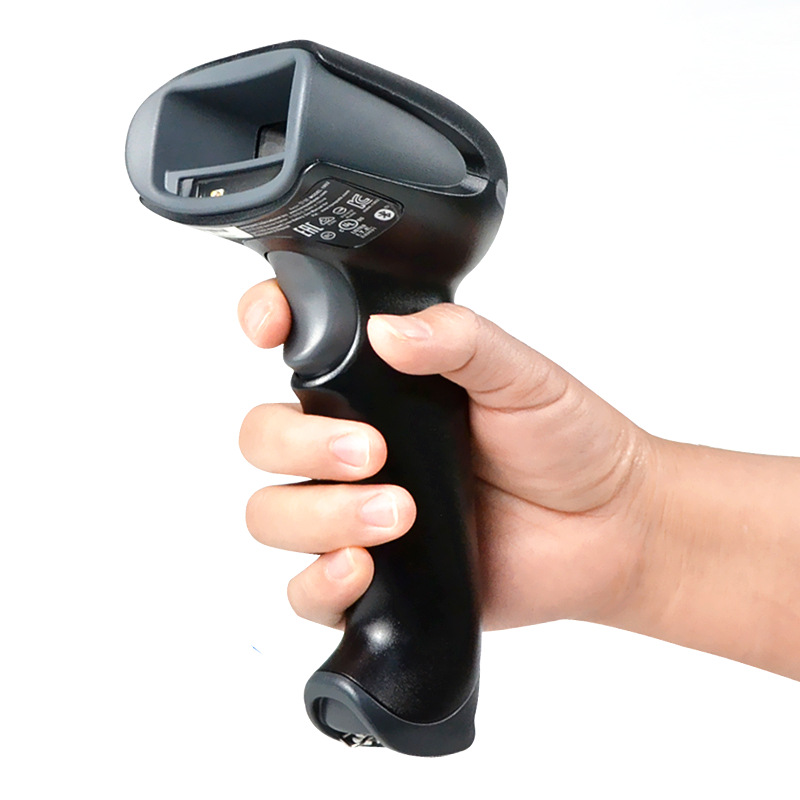
Image-based scanners, also known as 2D scanners, can read both 1D and 2D barcodes. They capture a picture of the barcode and use software to decode it. This makes them versatile and suitable for a variety of applications.
Functionality: 2D scanners can decode more data, making them perfect for reading complex barcodes like QR codes, which store website links or payment information.
How They Work: These scanners take an image of the barcode and use algorithms to decode it, allowing them to handle both 1D and 2D formats.
By understanding the capabilities of different scanners, you can choose the right one for your business or personal needs.
1D and 2D barcodes differ greatly in how much data they can store.
1D Barcodes: These can store around 20 characters of information, typically numeric or alphanumeric. They're often used for simpler data tracking, like product identification or inventory management.
2D Barcodes: These can store thousands of characters. For example, QR codes can hold up to 7,000 digits or 4,000 alphanumeric characters. Due to their higher data density, 2D barcodes are used for more complex applications, such as storing website URLs or detailed product information.
1D Barcodes: Often found in retail for basic product identification (UPC codes).
2D Barcodes: Preferred in industries like marketing, where QR codes link directly to websites, and healthcare, where Data Matrix codes store detailed patient data.
1D and 2D barcodes also differ in format, which affects how scanners read them.
1D Barcodes: These are linear barcodes, with data represented by varying widths of lines and spaces. They are simple, straightforward, and usually easier to scan but have limited data storage.
2D Barcodes: These use a matrix or grid format, where data is encoded in both vertical and horizontal directions. This format allows more data to be stored in a smaller space, but it requires a more sophisticated scanner to decode.
Linear vs Matrix: Linear 1D barcodes can be read by laser scanners, while 2D barcodes require image-based scanners that can capture the full matrix.
Understanding these differences helps when choosing which barcode type is best suited for specific applications.
The quality of the barcode plays a significant role in how well a scanner can read it. Several factors affect the readability of barcodes.
Print Quality: A barcode printed poorly or with smudged ink can make it unreadable. Clear, crisp lines and sufficient contrast are crucial for accurate scanning.
Size and Contrast: Barcodes that are too small or lack enough contrast between the bars and the background can be difficult for scanners to detect. High-contrast colors, like black on white, are the best for readability.
Common Issues:
Glare: Reflections on the barcode from overhead lights or other shiny surfaces can interfere with the scanner's ability to capture the barcode.
Tape Interference: If tape covers the barcode, it can cause distortions, making it hard for the scanner to read.
Damage: Scratches, tears, or dirt can obscure the barcode, affecting scanning accuracy.
To ensure smooth scanning, it’s essential to adjust your scanner settings based on the type of barcode you’re working with.
1D vs 2D Settings: Some scanners require you to switch between 1D and 2D scanning modes. 2D barcodes, like QR codes, require a scanner capable of reading both horizontal and vertical data.
Adjusting Sensitivity: Some scanners allow you to adjust sensitivity, which can help improve accuracy when scanning faded or worn-out barcodes.
Automatic Detection: Modern scanners often have automatic detection features, meaning they can adjust settings based on the type of barcode being scanned.
Proper settings and high-quality barcodes are key to ensuring fast and accurate scanning.
Choosing the right barcode scanner depends on the specific needs of your business.
1D vs 2D Scanners: If you mostly use traditional barcodes, such as UPC, a 1D scanner may be sufficient. However, if you need to scan QR codes or more complex data, a 2D scanner is essential.
Durability: In environments like warehouses or factories, you’ll need a rugged, durable scanner that can withstand drops and rough handling.
Battery Life: For mobile or field operations, look for scanners with longer battery life to avoid frequent recharging.
Wireless vs Wired: Wireless scanners offer flexibility and mobility, but wired scanners may provide faster and more reliable data transmission, especially in static environments.
Investing in a 2D scanner might be a smart move for the long term.
Growing Data Needs: As more industries adopt QR codes and other 2D barcodes, a 2D scanner ensures you’re prepared for future demands.
Versatility: 2D scanners can read both 1D and 2D barcodes, making them more versatile and future-proof for your business.
Choosing the right barcode scanner ensures it meets both current and future needs.
Simple and Affordable: 1D barcode scanners are easy to use and cost-effective, making them an ideal choice for basic barcode reading tasks.
Best for Retail and Grocery Stores: In environments like retail or grocery stores, 1D scanners work perfectly for scanning product barcodes that are typically linear (e.g., UPC codes).
Cannot Read 2D Barcodes: 1D scanners are limited to reading only one-dimensional barcodes, meaning they can’t scan QR codes, Data Matrix, or other 2D formats.
Limited Functionality for Complex Applications: As businesses grow and start using more data-dense barcodes, 1D scanners may not be sufficient for more advanced applications, such as tracking more detailed information or handling multiple data formats.
While 1D scanners are great for simple tasks, they may not meet the needs of businesses expanding into complex barcode use cases.
Versatility in Reading Both 1D and 2D Barcodes: 2D scanners can read both 1D and 2D barcodes, making them a versatile choice for businesses that use a variety of barcode formats.
Capable of Scanning QR Codes, Data Matrix Codes, and Other 2D Formats: These scanners can decode more complex barcodes, such as QR codes, which are commonly used in marketing and payments.
Better for Complex Applications: 2D barcodes can store significantly more data, which makes 2D scanners ideal for applications where larger amounts of information need to be stored in a smaller space, such as inventory management or product tracking.
Higher Cost Compared to 1D Scanners: 2D barcode scanners tend to be more expensive than 1D scanners, which might not be cost-effective for businesses with simple needs.
Potentially More Complex and Feature-Rich Than Necessary: For businesses that only require basic barcode reading, a 2D scanner may be overkill, offering more features than needed.
2D barcode scanners provide enhanced functionality but may not always be necessary for simple tasks or businesses on a budget.
Barcode scanners may fail to read barcodes for a variety of reasons. Here are some common issues and tips for troubleshooting:
Low Contrast: Barcodes with poor contrast (e.g., faded ink or similar-colored background) can be hard to scan. Make sure the barcode has clear black lines on a light background.
Dirty Lens: Dirt, dust, or fingerprints on the scanner’s lens can prevent it from reading barcodes properly. Regularly clean the lens to maintain optimal performance.
Improper Settings: Incorrect scanner settings, like scanning mode (1D vs 2D), can lead to errors. Ensure the scanner is set to the correct mode for the barcode type you're scanning.
Check the Barcode: Ensure it’s printed clearly and isn’t damaged.
Test Different Scanners: If one scanner doesn’t work, try another to see if the issue is with the scanner itself.
Adjust Scanner Settings: Double-check if the scanner is set to read the correct barcode type.
By addressing these common issues, you can improve your barcode scanning experience.
Creating and printing high-quality barcodes ensures smoother scanning and fewer errors. Here are some tips to follow:
Choose the Right Size: Make sure the barcode is large enough to be scanned easily but not too large for the space.
Ensure High Contrast: Use black bars on a white background for maximum visibility. Avoid using similar colors for the bars and background.
Avoid Distortion: Ensure the barcode is printed clearly, with no distortion or smudges. A distorted barcode can be difficult for scanners to read.
To maintain optimal performance, regular maintenance is key. Here’s how to keep your scanners running smoothly:
Clean the Lens: Dust and dirt on the scanner lens can interfere with its ability to read barcodes. Clean the lens frequently using a soft cloth.
Calibrate Regularly: Periodically calibrate your scanner to ensure it reads barcodes accurately. Follow the manufacturer’s instructions for proper calibration.
Check for Software Updates: Keep your scanner’s software updated to improve performance and fix potential bugs.
By following these practices, you’ll ensure smoother barcode scanning and fewer interruptions in your workflow.
In this article, we discussed the differences between 1D and 2D barcodes and how scanners vary in their compatibility. Choosing the right scanner depends on the barcode types you use and the specific needs of your business. Whether you need a simple 1D scanner or a versatile 2D scanner, it's essential to select the right tool for efficient scanning and optimal performance.
A: 2D barcode scanners can read barcodes from any angle, unlike 1D scanners which require specific orientation.
A: Yes, you will need a 2D imager scanner to read QR codes as they are 2D barcodes.
A: Barcodes may be difficult to scan due to low contrast, poor print quality, or damage.
A: 2D barcode scanners are ideal for warehouses due to their ability to scan both 1D and 2D barcodes in various conditions.
A: Yes, 2D imager scanners can read barcodes on phone screens, including QR codes and other 2D formats.


